Location Filter
Restrict an automation so it only acts on tradeflows that travel through the places you care about.
Overview
The location filter is a step you add to an automation. When the automation runs, this step looks at the tradeflow's planned route. If the route does not match what you configured, the automation stops at this step and none of the following steps run.
You can match on three kinds of place:
| Match on | Example | Notes |
|---|---|---|
| Location | Antwerp, Rotterdam, a specific terminal | The most precise option |
| Country | Belgium, Vietnam | Selecting a country includes all ports and locations within it |
| Continent | Europe, Asia | The broadest option, useful for whole trade lanes |
You can also require that the matching place plays a particular role in the journey, such as port of loading or port of discharge.
Use cases:
- Flag only the tradeflows that discharge in Europe
- Notify a regional team about everything loading in Asia
- Watch a single terminal without touching the rest of your traffic
Adding the Step
- Navigate to Automations from the main menu
- Open the automation you want to change, or create a new one
- Add a step and choose Location filter
- Configure the step as described below
- Click Save
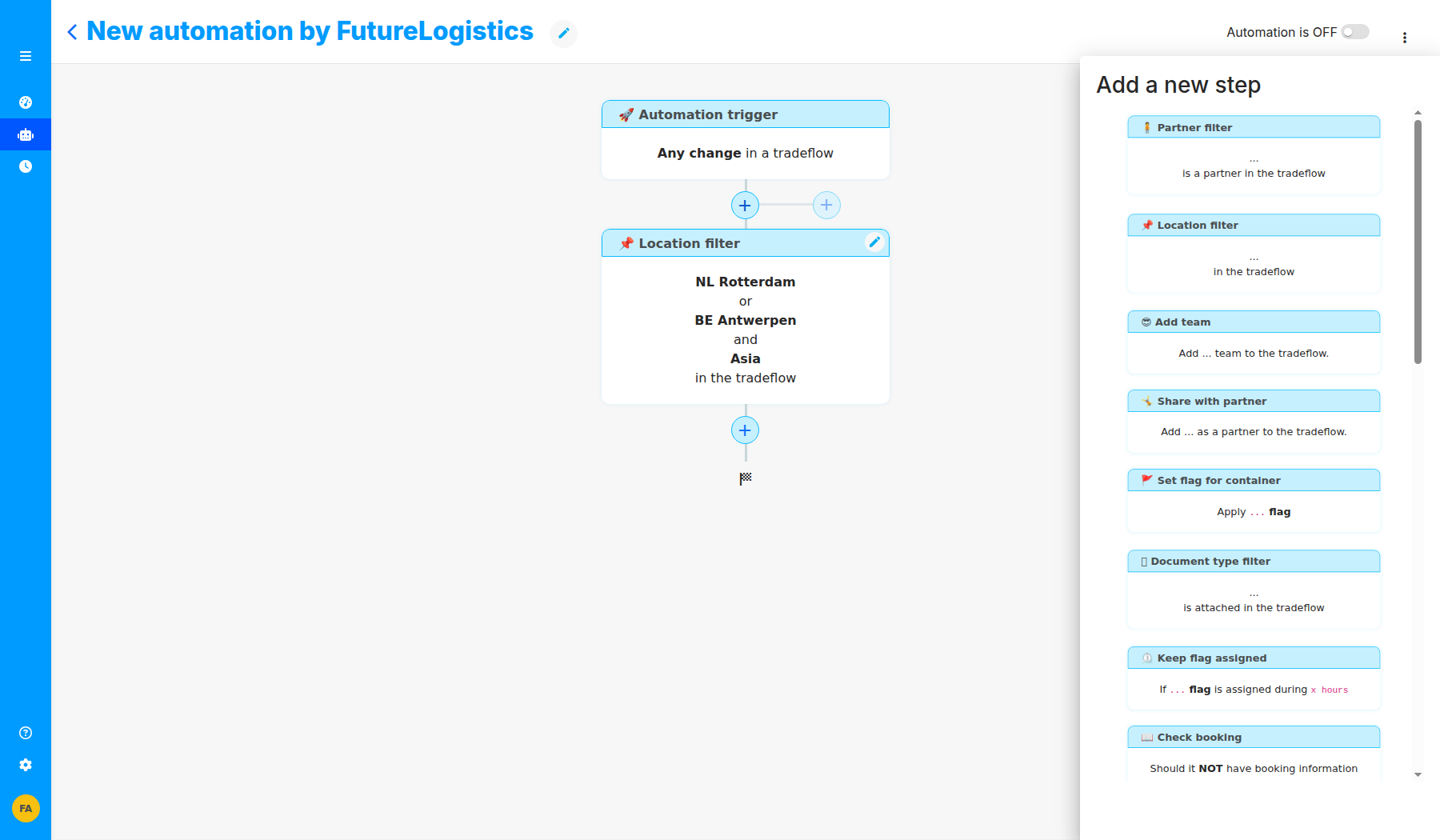 Figure 1: Add a step and choose Location filter. Filters appear once the automation has a trigger.
Configuring the Filter
Locations
Use the location picker to select one or more locations. The picker accepts ports, terminals, inland locations, and countries.
Selecting a country includes all ports and locations within that country, so you do not need to list them individually.
Continent
Select one or more continents from the Continent dropdown. Seven values are available:
- Africa
- Antarctica
- Asia
- Europe
- North America
- Oceania
- South America
Each country in Dockflow carries exactly one continent, so a location's continent follows from the country it sits in.
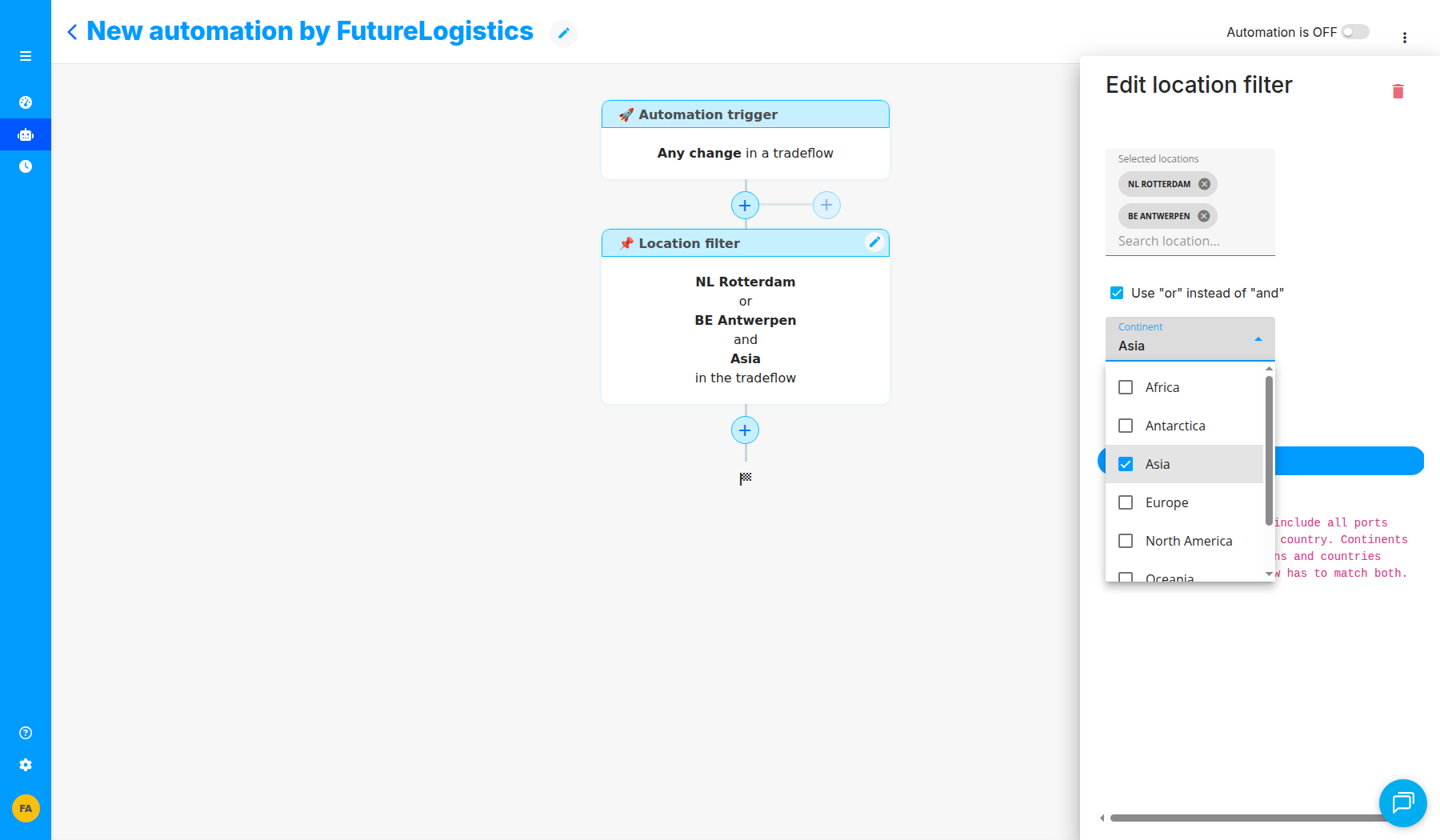 Figure 2: The Continent dropdown. Here Asia is selected alongside two locations, and the step summary on the left shows how they combine.
Restrict Role of Location
By default any location in the transport plan counts as a match. Use Restrict role of location to require a specific role instead:
| Option | Matches |
|---|---|
| Port of Loading | The origin port where the container is loaded |
| T/S location | A transshipment port along the way |
| Port of Discharge | The final destination port |
You can select more than one role. Leave the field empty to consider every location in the plan.
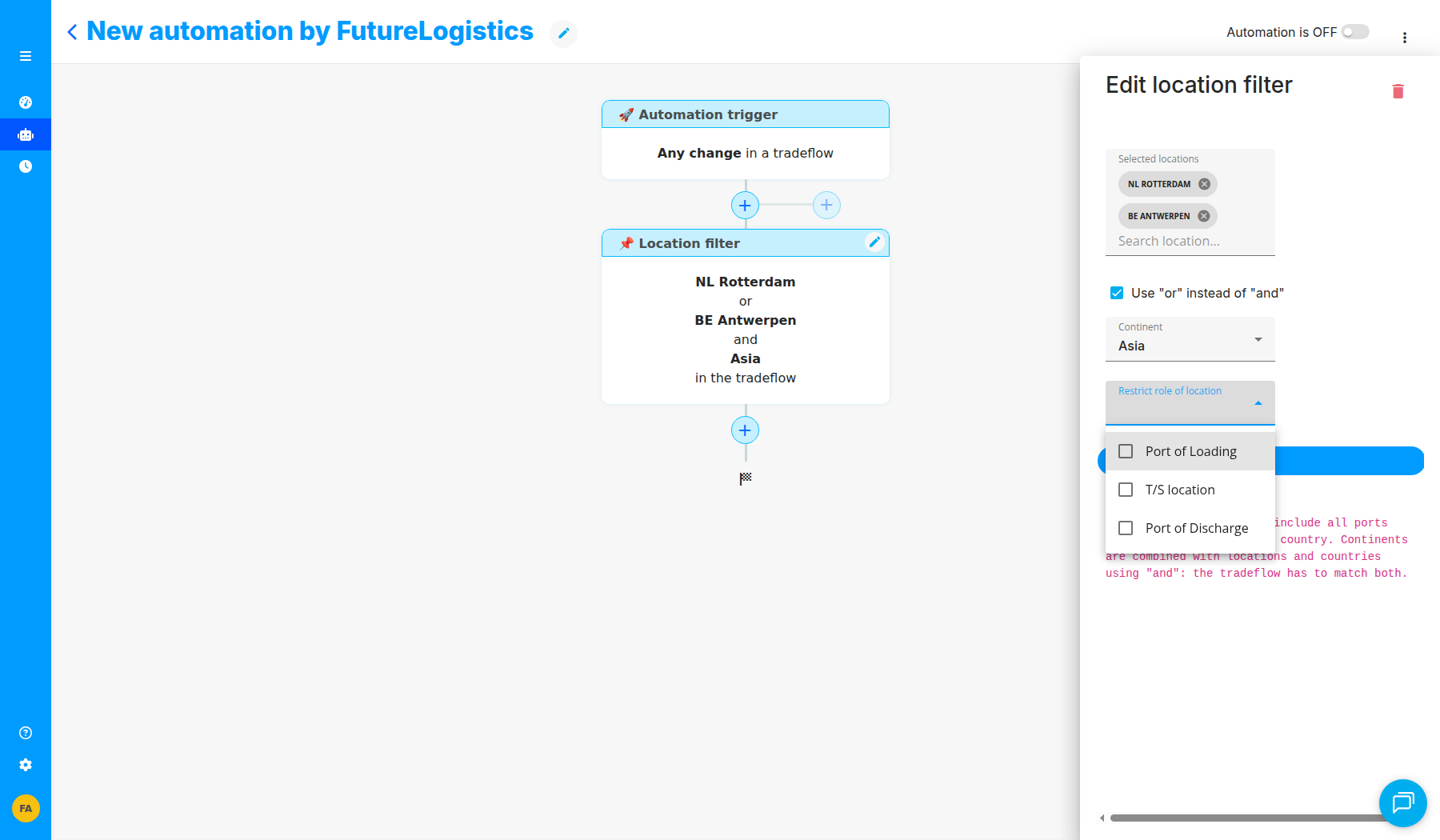 Figure 3: Restricting the filter to a specific role in the journey.
This restriction is applied first. The filter then checks your selected locations, countries, and continents against only the locations that hold one of the chosen roles.
Use "or" Instead of "and"
When you select more than one location, or more than one continent, a checkbox appears that switches the matching from and to or:
- Unticked (default): every selected entry must be found in the tradeflow
- Ticked: finding any one selected entry is enough
This setting applies within a group. It changes how multiple locations are compared against each other, and how multiple continents are compared against each other. It does not change how the location group and the continent group combine, which is covered next. That is why the checkbox does not appear when you pick a single location and a single continent: there is nothing within either group for it to act on.
How Matching Works
The three kinds of place do not all combine the same way.
| What you selected | The tradeflow matches when |
|---|---|
| Locations only | It touches your selected locations |
| Countries only | It touches your selected countries |
| Continents only | It touches your selected continents |
| Locations and countries | It touches your selected locations or your selected countries |
| Continents plus locations or countries | It satisfies the location and country condition, and also touches a selected continent |
Every check asks whether the tradeflow touches a place anywhere in its journey, so the conditions can be satisfied at different points of the same route.
The step summary spells out the combination it will apply, so it is worth reading back after saving:
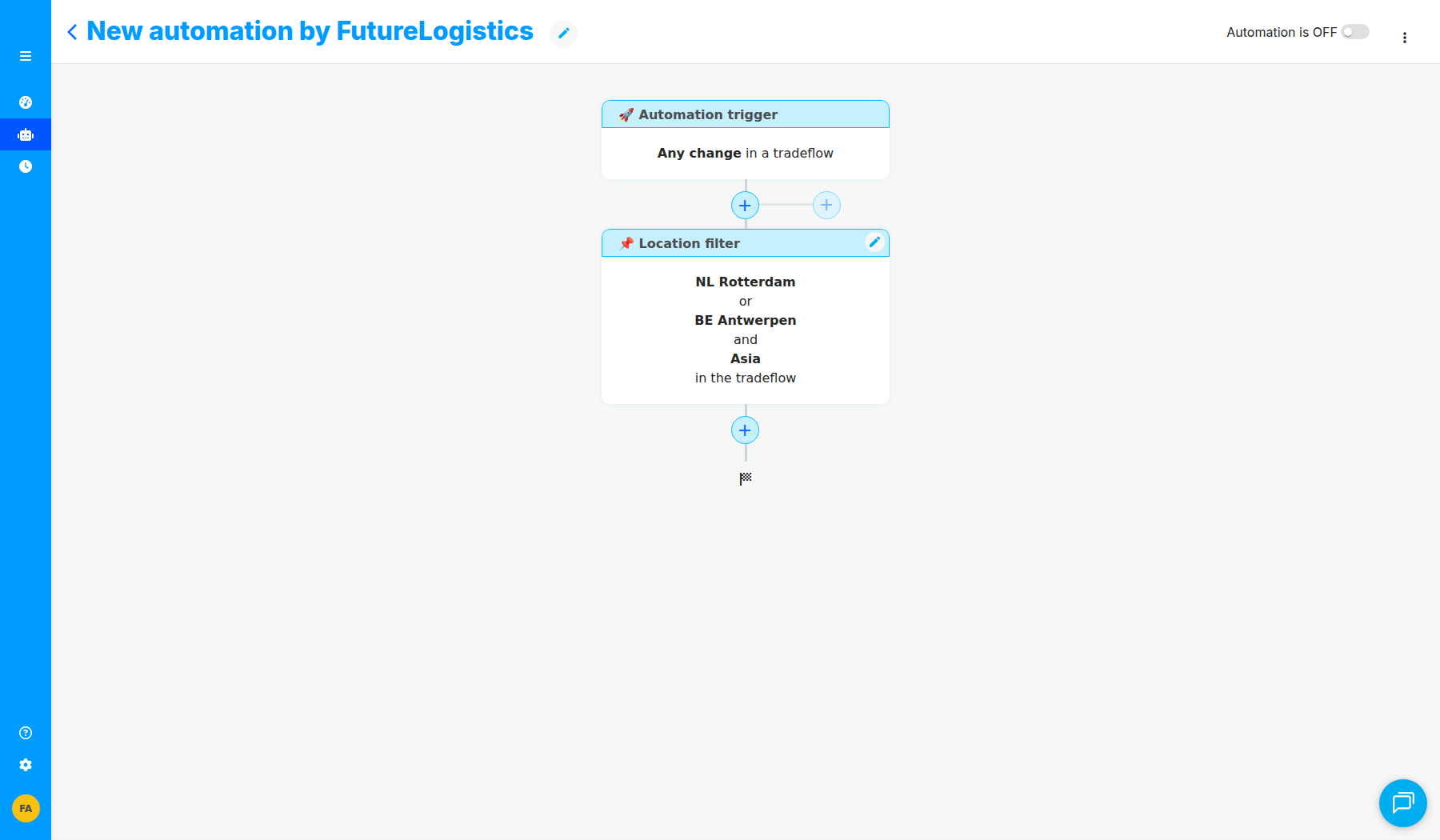 Figure 4: Two locations combined with "or", then intersected with a continent using "and".
When you combine a continent with a location or a country, the tradeflow has to satisfy both conditions. Ticking "Use or instead of and" does not change this, because that checkbox only applies within a group.
The two conditions do not have to be met at the same place. A filter of Antwerp plus Asia matches a Shanghai to Antwerp tradeflow, because that route calls at Antwerp and it also calls somewhere in Asia. The same filter does not match a purely European route that calls at Antwerp.
So this combination is the way to say "Antwerp, but only on Asian trades". It is not a way to say "Antwerp or anywhere in Asia". For that, use two separate automations.
Examples
Everything discharging in Europe
- Continent: Europe
- Restrict role of location: Port of Discharge
Matches every tradeflow whose final port of discharge is in a European country.
Anything loading in Asia or Oceania
- Continent: Asia, Oceania
- Restrict role of location: Port of Loading
- Use "or" instead of "and": ticked
Without the checkbox, a tradeflow would have to load in Asia and in Oceania, which is far rarer than intended.
Antwerp, but only on Asian trades
- Locations: Antwerp
- Continent: Asia
Matches routes that call at Antwerp and also call somewhere in Asia. A purely European route through Antwerp does not match.
A single terminal
- Locations: the terminal
- Restrict role of location: leave empty
Matches whenever that terminal appears anywhere in the journey.
Asian origins, but only when they transship
- Continent: Asia
- Restrict role of location: T/S location
Matches tradeflows that pass through a transshipment port in Asia.
Troubleshooting
The automation never fires
Check whether you combined a continent with a location or country. These intersect, so the route has to satisfy both conditions. Combining Antwerp with Asia only matches routes that call at Antwerp and call somewhere in Asia, which excludes every purely European journey through Antwerp. See the warning above.
Check the role restriction. If you restricted to Port of Discharge but your locations are origin ports, nothing will match.
Check the "or" setting. With several entries and the checkbox unticked, every single one has to be present in the same tradeflow.
The automation fires more often than expected
You may have left Restrict role of location empty, which matches the place anywhere in the journey, including transshipment stops you were not thinking about. Restrict to the role you actually mean.
A tradeflow is not matching its continent
A small number of country records carry no continent, so locations in them never match a continent filter. These are placeholder or uninhabited entries: "Unknown", Ashmore and Cartier Islands, the French Southern and Antarctic Lands, and one blank record. Between them they hold eight locations. If you hit this on a country that matters to you, contact support and it can be corrected.
The Continent dropdown is empty
Reload the page. If it stays empty, your environment may not have the latest release yet.
Need Help?
- In-app support - Click the help icon in the Automations section
- Email support - [email protected]
Last updated: August 4, 2026